Step 1 — Upload
Upload one spreadsheet file from your computer.
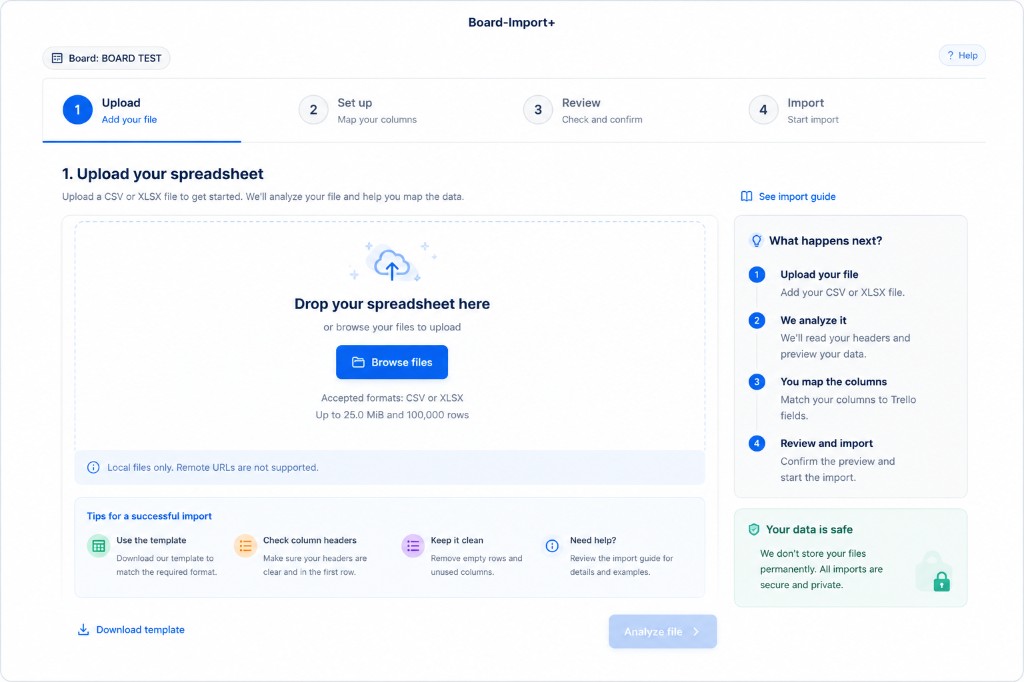
Accepted files
- CSV (
.csv) - Excel (
.xlsx, without macros)
One file at a time. Remote URLs and Google Sheets links are not supported.
Limits
- Maximum file size: 25.0 MiB
- Maximum rows: 100,000
If your file is larger, split it into smaller files and import them separately.
How to upload
Option A — Drag and drop
Drag your file onto the upload area.
Option B — Browse
Click Browse files and choose the file from your computer.
Download template
Not sure how to format your data? Click Download template for a starter CSV with the most common columns.
Tips for a successful import
- Use the template — download the template to match the expected format.
- Check column headers — put clear headers in the first row of your data.
- Keep it clean — remove empty rows and unused columns before uploading.
Continue
When the file is selected, click Analyze file. Board-Import+ reads your headers and moves you to Set up.
Need help while you work? Click ? Help in the top-right corner of the modal.