Import options
Choose how lists, labels, and dates are handled before you review the final import.
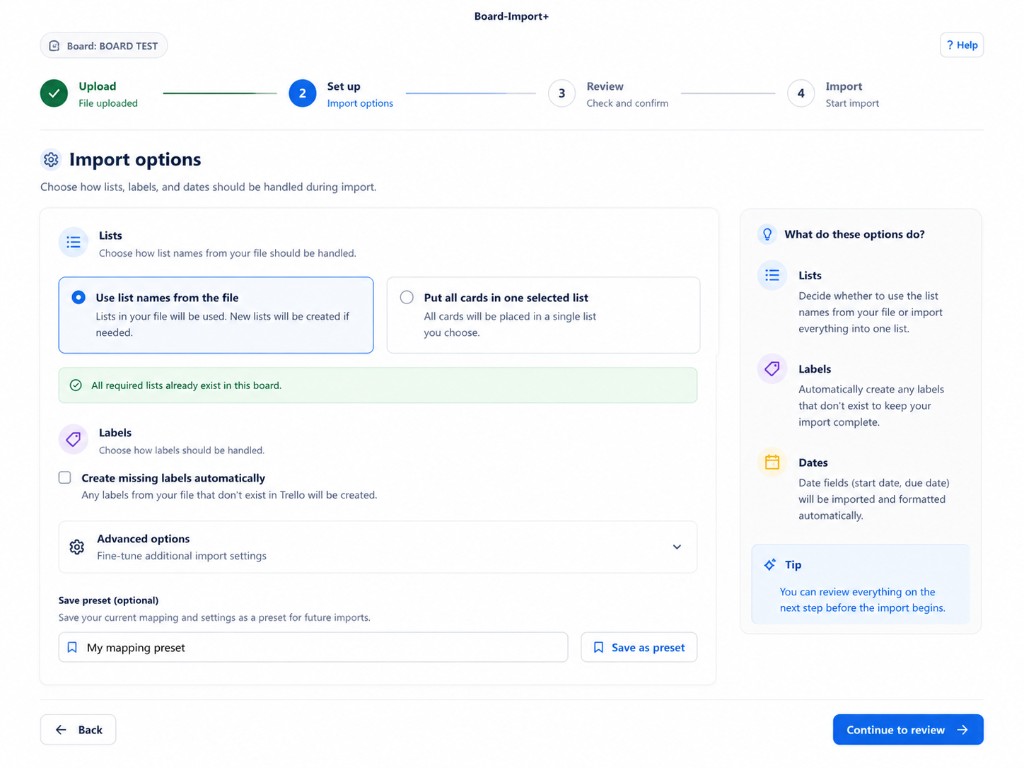
Lists
Pick one of these options:
| Option | When to use it |
|---|---|
| Use list names from the file | Your spreadsheet has a List column and you want cards placed in matching board lists. New lists are created if they do not exist yet. |
| Put all cards in one selected list | Every imported card should go into a single list you choose. |
When all lists from the file already exist on the board, you will see a green message: All required lists already exist in this board.
Labels
Create missing labels automatically — when checked, labels found in your file that do not exist on the board are created during import. Leave it unchecked if you only want to use labels that already exist.
Advanced options
Expand Advanced options for fine-tuning such as date handling. You can review everything again on the next step before the import begins.
Save a preset
If you import the same file shape often, enter a name under Save preset as and click Save as preset. Next time, pick it from the preset menu on the Set up step.
Continue
Click Continue to review when the options look right.