Board-Import+ user guide
Board-Import+ is a Trello Power-Up that imports CSV and XLSX spreadsheets into your board.
You stay in control at every step:
- Upload — add your file
- Set up — map your columns and choose import options
- Review — check and confirm before anything is created
- Import — watch progress while cards are created
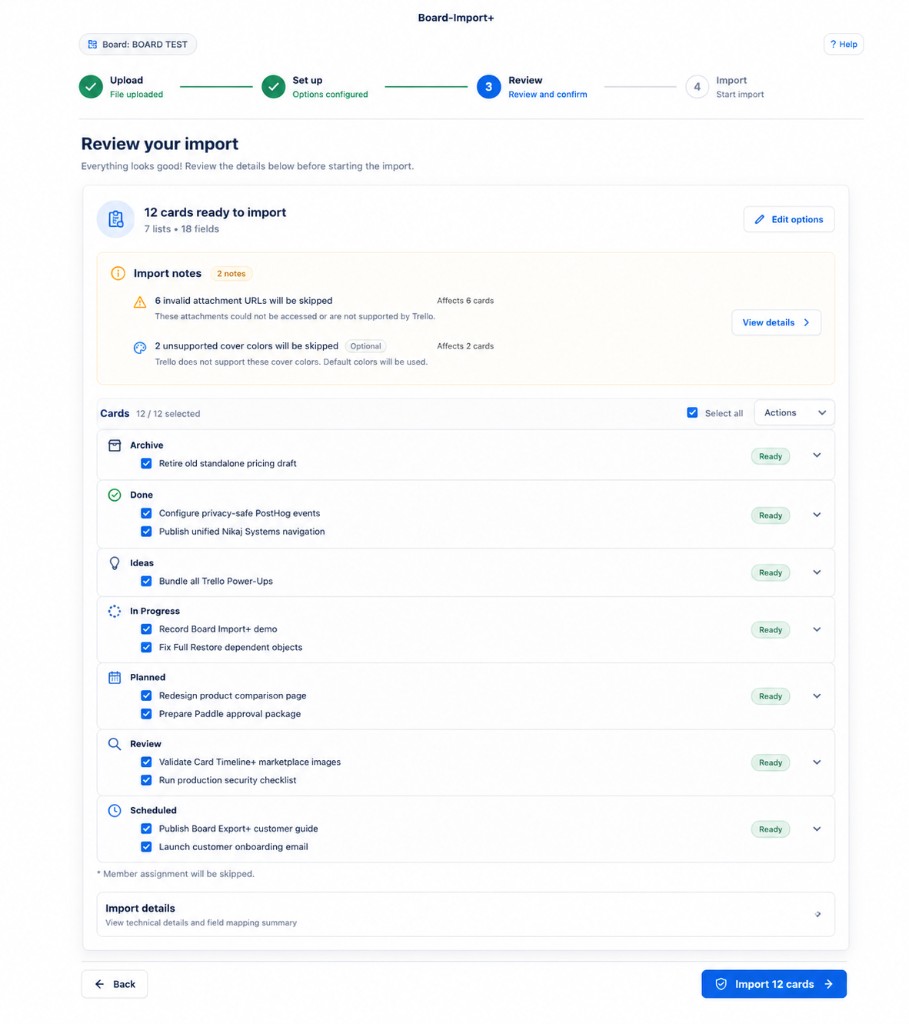
What you can import
| Data | Supported |
|---|---|
| Card name | Yes |
| Description | Yes |
| List | Yes |
| Labels | Yes |
| Members | Yes |
| Start date / due date | Yes |
| Checklists and custom fields | Yes (when mapped) |
| Board Export+ files | Yes — full restore when detected |
What is not supported
- Google Sheets links or remote URLs
- JSON,
.xls, or macro-enabled workbooks - Attachments, comments, or card updates
- Undo / rollback after cards are created
Quick start
- Install Board-Import+ on your board
- Start an import — click Import on your board
- Follow the upload → review → import walkthrough
Good to know
- Files stay on your device until you upload them. Only local files are accepted.
- Default limits: 25 MiB, up to 100,000 rows, CSV or XLSX.
- Nothing is written to Trello until you click Import on the Review step.
- Imports continue in the background. You can close the modal and reopen it from Import History.
Questions? See the FAQ or email support@nikaj.dev.