Step 3 — Review
Review every card before anything is created on your board. This is your last chance to change what gets imported.
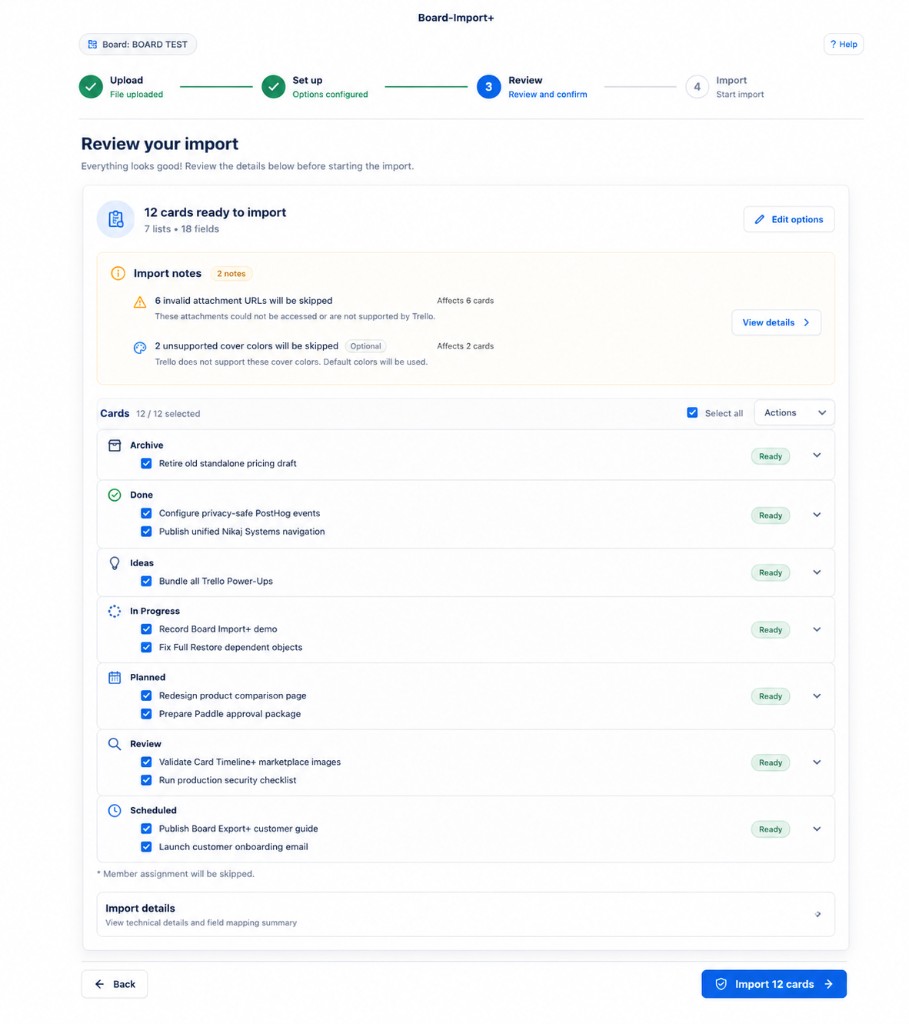
Summary
At the top you see:
- how many cards are ready to import (for example, 12 cards ready to import)
- how many lists and fields are involved (for example, 7 lists • 18 fields)
Click Edit options if you need to go back and change list or label settings.
Import notes
Orange Import notes call out rows that will be skipped or changed, for example:
- invalid attachment URLs that Trello cannot use
- unsupported cover colors (Trello will use default colors instead)
- member values that do not match board members
Click View details to see which cards are affected.
Select cards
Cards are grouped by destination list. For each card you can:
- check or uncheck it
- use Select all to include or exclude everything
- use the Actions menu for bulk changes
Only checked cards are imported. Cards marked Ready will be created when you confirm.
Import details
Expand Import details to see the field mapping summary and other technical details about the planned import.
Confirm
When you are satisfied, click Import N cards (where N is the number of selected cards).
Use Back if you need to change mapping or import options.